
Professional Check Templates Design, Customize Print Instantly
Choose from business check templates, payroll check templates, personal check templates, and blank check templates customize online and print on any blank check stock paper.
OnlineCheckWriter.com - powered by Zil Money, is a financial technology company, not a bank. Banking and money movement services are provided through partner financial institutions and licensed service providers. FDIC insurance coverage applies only to eligible deposit products and accounts, and is subject to applicable terms, conditions, limitations, and requirements. Additional information regarding partner institutions, products, and services is available in the applicable terms and agreements.






A Check Template Lets You Print a Professional Check Without Ordering Pre-Printed Checks
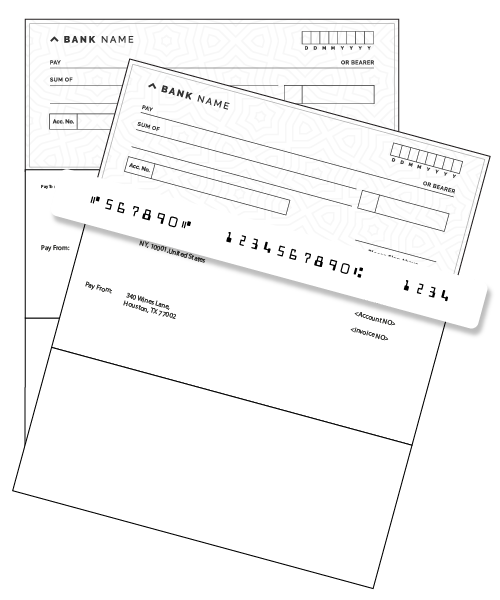
A check template is a ready-made digital layout that contains every field a bank-compatible check requires: payee line, date, dollar amount, written amount, memo, signature area, and the MICR line carrying your routing and account numbers. You fill in the details, and print the finished check onto blank check stock paper from your own printer.
Before cloud-based check templates existed, businesses had two options: order pre-printed checks from a bank or vendor (slow, expensive, inflexible), or hand-write checks from a paper checkbook (error-prone, difficult to track). A check template on OnlineCheckWriter.com replaces both giving you a formatted, professional-looking check you can generate on demand, anytime, from your computer.
The Check 21 Act in the United States permits printed checks of this kind to be processed through the banking system, making check templates a practical, widely used solution for businesses of all sizes.
Why Businesses Struggle Without a Check Template
- Pre-printed check orders take days you wait, payments are delayed
- Minimum order quantities mean unused checks when details change
- A new bank account or address means reordering the entire stock
- No consistent brand look checks feel generic and unpolished
- Handwritten checks are slow, hard to track, and easy to mis-write
- No quick way to produce a payroll check template for multiple employees
Check Templates on OnlineCheckWriter.com
- Design your check template once print instantly whenever needed
- Print only the number of checks you actually need, no minimums
- Update logo, account details, or layout in seconds, not weeks
- Add your company logo and fonts for a branded, professional look
- Payroll check templates for batch employee payments in one run
- Blank check template option to build your own design from scratch
$1M+
Business Accounts
20M+
$91B+
Transaction Volume
80%
Check Cost Savings
Which Check Template Is Right for You?
OnlineCheckWriter.com offers several check template types, each built for a different payment scenario. Here is what each one is and when to use it.
Business Check Template
A standard business check template includes your company name, address, bank account details, and MICR line. You can add your logo and choose from multiple layout formats. It is the most commonly used check template for vendor payments, contractor payments, and general business disbursements.
Payroll Check Template
A payroll check template is formatted specifically for employee payments. It includes fields for employee name, pay period, earnings breakdown, and deductions displayed clearly on a pay stub portion of the check. You can run payroll for multiple employees in a single batch, generating individual check templates for each person.
Personal Check Template
A personal check template carries individual name and bank details rather than business information. It follows the same standard check format but is suited to personal payments rent, personal loans, private transactions where a business check template would look out of place.
Blank Check Template
A blank check template provides the structural layout of a standard check MICR line, signature area, amount box without preset styling. It is the starting point when you want to build a custom design from scratch. Using the drag-and-drop editor, you position every element yourself and save it as your own custom check template.
Premium Check Template
Premium check templates are professionally designed layouts with refined typography, subtle background patterns, and polished formatting. They are ready to use without heavy customization select one, add your details, and print. A good choice when first impression and visual quality of the check matter.
See The Interactive Demo ⬇
What Every Check Template Contains And Why Each Field Matters
If you are using a check template for the first time, it helps to understand what each field is, where it appears, and why banks need it. OnlineCheckWriter.com pre-fills many of these automatically from your account you only enter the payment-specific details each time.
How to Set Up and Use a Check Template on OnlineCheckWriter.com
From first login to printed check here is the full process explained clearly.

Create Your Account and Add Your Bank
Sign up at OnlineCheckWriter.com and connect your bank account. Your routing and account numbers are used to automatically populate the MICR line on every check template you use you don’t need to type them manually each time.

Choose a Check Template
Browse the template library. Select a business check template for vendor payments, a payroll check template for employee pay, a personal check template for individual use, or a blank check template to design your own from scratch. Premium check template options are also available for a more polished look.

Customize the Check Template
Open the drag-and-drop editor. Upload your company logo and position it. Choose your preferred font for the payee line and other text fields. Adjust the layout top-check, middle-check, or bottom-check format. Save the customized check template for reuse. You can maintain multiple saved templates for different purposes.

Enter the Check Details
For each payment, enter the payee name, date, and amount. The written amount converts automatically. Add an optional memo for tracking. For payroll check templates, you can import employee data and generate multiple checks in a single batch run.

Print on Blank Check Stock
Load blank check stock paper into your printer this is standard paper with security features built in, available from office supply retailers. Print your check template onto it using any laser printer. The result is a complete, bank-compatible check. Verify MICR readability with your bank if you are printing for the first time.

Track and Manage Your Check Register
Every check generated from a check template is automatically logged. Print a check register at any time for payment tracking, or export records for your accounting software. Nothing falls through the cracks.
How to Customize a Check Template: Logo, Fonts, Layout, and More
A check template does not need to look generic. OnlineCheckWriter.com’s editor lets you tailor every visual element to match your business identity.
Add Your Company Logo
Upload any logo file and position it on the check template using drag-and-drop. The logo appears on every check printed from that template automatically.
Choose Your Font Style
Select from multiple font options for the payee line, address, and other text elements. A font choice makes your checks look intentional rather than default.
Select Check Format
Choose whether the check appears at the top, middle, or bottom of the page — each format leaves space for different stub or voucher layouts below or above.
Add a Signature Image
Upload an authorized signature image to pre-place on the check template. Useful for high-volume check printing where individual wet signing is impractical.
Save Multiple Templates
Save a separate check template for vendor payments, another for payroll, another for petty cash. Switch between them instantly without reconfiguring anything.
Update Anytime
Changed banks? New address? Updated logo? Edit the check template and the change applies immediately to all future checks — no reordering, no wasted stock.
What Is Blank Check Stock And Why Your Check Template Needs It
A check template provides the formatting. Blank check stock provides the physical medium. Together they produce a complete, usable check.
Blank check stock is paper manufactured to standard banking dimensions with security features built into the paper itself background patterns, void pantograph (the word “VOID” that appears if someone photocopies the check), and security fibers. It does not come pre-printed with any bank name, routing number, or account number. That is all provided by the check template.
You load blank check stock into your laser printer the same way you would any paper. The check template prints over it, producing a finished check with all the required fields, the MICR line, your logo, and your bank information in the correct positions.
Blank check stock is available from office supply retailers and specialist paper vendors. The two most common formats are top-check (check printed on the top third of the page, with two voucher stubs below) and bottom-check. Make sure the blank stock format you buy matches the check template layout you have selected in OnlineCheckWriter.com.
FREQUENTLY ASKED QUESTIONS
What is a check template and how is it different from a pre-printed check?
A check template is a digital layout containing all the standard fields of a bank check. You fill in the payment details, and the finished check is printed onto blank check stock from your own printer. A pre-printed check comes from a bank or check printing vendor with your bank details already printed on the paper. You write or type the payee, amount, and date, and sign it but everything else is fixed at time of printing. If your account details change, the pre-printed stock becomes unusable. A check template keeps the layout digital. Your bank details are stored in the platform and applied to each check when you print. Change your address or logo, and every future check reflects the update immediately no reorder, no waste.
What types of check templates are available on OnlineCheckWriter.com?
OnlineCheckWriter.com offers: business check templates for vendor and supplier payments; payroll check templates for employee pay with stub details; personal check templates for individual use; blank check templates as a starting point for fully custom designs; and premium check templates professionally designed layouts ready to use with minimal customization.
What is a blank check template and when should I use one?
A blank check template is a bare-bones check layout it contains the correct structural positions for the MICR line, signature area, payee line, and amount box, but no preset branding or styling. You use it as a starting canvas in the drag-and-drop editor to build a fully custom check design from scratch. A blank check template is the right choice if you want complete control over the visual design, or if you are building a check template that precisely matches an existing brand style guide.
What is a payroll check template and how do I use it for employees?
A payroll check template is formatted for employee payment. It includes the standard check fields plus a stub area for pay period, gross earnings, deductions, and net pay. This gives employees a clear record of their payment details alongside the check itself. To use it: select the payroll check template in OnlineCheckWriter.com, enter or import your employee payment data, preview each check, and print the batch. Each employee receives their own check with their specific payroll details. This is significantly faster than writing individual payroll checks manually.
Can I print check templates at home or at my office?
Yes. OnlineCheckWriter.com's check templates are designed to print on standard laser printers using blank check stock paper. You do not need a dedicated check printer or special hardware the same printer you use for invoices or documents typically works. Load blank check stock (available at office supply stores) into your printer, print the check template, and you have a finished check. It is advisable to run a test print on plain paper first to confirm alignment before printing on check stock.
How do I add my company logo to a check template?
Open the check template editor in OnlineCheckWriter.com. Select the logo placement area, upload your image file, and position it using the drag-and-drop interface. Save the template your logo will appear on every check printed from it going forward. You can also adjust size and position if the default placement doesn't suit your preferred layout.
Is it legal to print your own checks using a check template?
In the United States, the Check 21 Act provides the legal framework under which printed checks are processed through the banking system. Many thousands of businesses use check templates to print checks on blank check stock daily. The key requirements are that the check includes a correct MICR line (routing number, account number, check number in machine-readable format), meets standard check dimensions, and is printed on appropriate check stock. OnlineCheckWriter.com's templates are built to these specifications. That said, we recommend confirming with your own bank that printed checks meet their acceptance requirements before beginning a large print run.
What blank check stock should I buy to print check templates?
Buy blank check stock that matches the format of your selected check template top-check, middle-check, or bottom-check. The most common format for business use is top-check (check on the top third of the page, with two stubs below). Look for check stock that includes security features: void pantograph, security fibers, and a microprint signature line. These features are built into the paper and make the check harder to alter or counterfeit. Blank check stock is available from most office supply retailers and specialist paper vendors online.
Can I save multiple check templates for different purposes?
Yes. OnlineCheckWriter.com lets you save multiple check templates under your account. You might keep a business check template for vendor payments, a payroll check template for employee runs, and a personal check template for individual transactions each with its own logo, font, and layout settings. Switching between them when printing takes only a few seconds.
What is the difference between a "check template" and a "cheque template"?
"Check" and "cheque" refer to the same payment document. "Check" is the standard spelling in the United States; "cheque" is used in the United Kingdom, Canada, Australia, and most other Commonwealth countries. "Check template" and "cheque template" describe the same thing a pre-formatted layout used to produce a check or cheque for payment. OnlineCheckWriter.com primarily serves the U.S. market, where "check template" is the standard term.
How does the check register work with check templates?
Every check generated from a check template in OnlineCheckWriter.com is automatically recorded in a check register a running log of checks issued, including payee, amount, date, and check number. You can view, sort, and export this register at any time. It makes reconciliation against your bank statement straightforward, and gives you a complete payment history without maintaining a manual paper register.
Find Your Check Template
Business, payroll, personal, blank, or premium browse all check templates and start customizing in minutes.
Real Stories, Real Results
Experience fast, secure, and cost-effective payments


Karla C.
"The best online software"
Save time

Chansa Catherine
"Overall it was a good experience, loved the mobile app, came in handy when on the move out of the office"
Money arrives in minutes

Danylo
"I use Online Check Writer daily and I am satisfied that I selected that product"