• Products
    • Industries We Serve
      • Government
      • Utilities
      • Medical Practices
      • Legal Service
      • Hospitals
      • Education
      • Call Centers
      • Insurance
      • Mass Transit
      • Nonprofits
      • Membership Clubs
      • Retail
      • Real Estate
      • Billing Service
    • Accounts Payable
      • Send Payment
      • Receive Payments
      • Bill Payments
      • Mass/Bulk Payments
      • Print Checks Yourself Now
      • Mail Check USPS/FedEx
      • eChecks
      • Invoice Management
      • Integrations
      • ACH/Direct Deposit
      • Domestic Wire
      • International Payments
      • Virtual Card
      • Pay By Credit Card
      • Payroll by Credit Card
      • Overnight Check Mail
      • Email to Bill
    • Accounts Receivable
      • Request Payments
      • Send Payment Links
      • Check Draft
      • Deposit Slip
      • Invoice Management
    • Business Tools
      • Digital Wallet
      • Positive Pay
      • User Access
      • Integration
      • Virtual Card API
      • Document Mailing
      • Shipping Label
      • Expense Management
      • Bank Data
      • Bank Reconciliation
      • Developer API
      • Enterprise
      • All
  • Pricing
  • Integration
    • All
    • QuickBooks Online
    • Quickbooks Desktop
    • Zoho Books
    • Zoho Payroll
    • Gusto
    • Zapier
    • Xero
    • Bill.com
    • FreshBooks
    • Sage
    • Wave
    • ADP
    • Square Payroll
    • odoo
  • What’s New
  • Book A Demo
  • Contact
  • Log In
  • Sign Up

Gusto Integration with The Check Printing Platform

Gusto Integration with OnlineCheckWriter.com – powered by Zil Money, allows users to import payroll checks seamlessly. With the check printing software, users can easily customize and print checks from anywhere using blank paper and a printer. Businesses can make payments hassle-free and affordable via various payment methods, such as checks, ACH, wire, and payment links.

OnlineCheckWriter.com - Powered by Zil Money, is a financial technology company and not a bank. Banking services are provided by our partner bank, Member FDIC. FDIC insurance applies only to eligible products associated with those that have funds held in accounts at the partner bank, subject to applicable limits and requirements.

   ISO 27001  ISO 2200  ISO 9001  CCPA  NIST 800 53HIPAA

See The Interactive Demo ⬇

1

Integrate by Authorization

2

Select Companies to Connect

3

Click on Import

1

Install Integration Software

2

Login and Connect with
QuickBooks Desktop

3

Click on Import

Steps to Integrate
Integration with Banks and Other Accounting Softwares

Step 1

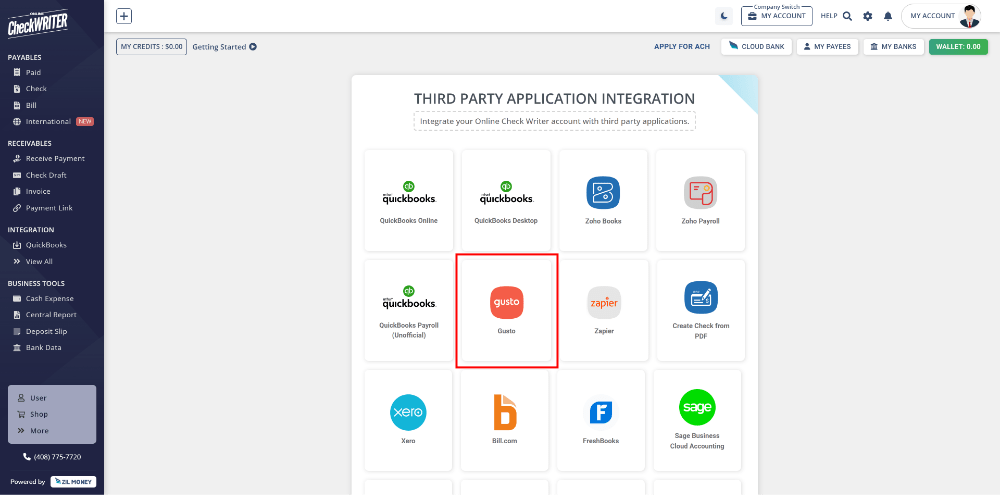
Select Gusto from Third Party Integration Menu and Click on Connect.

A list of applications that you can integrate with Online Check Writer are displayed in the Integration page. Click on Gusto to select and from the next page, click on connect to initiate the integration.
Integration with Banks and Other Accounting Softwares

Step 2

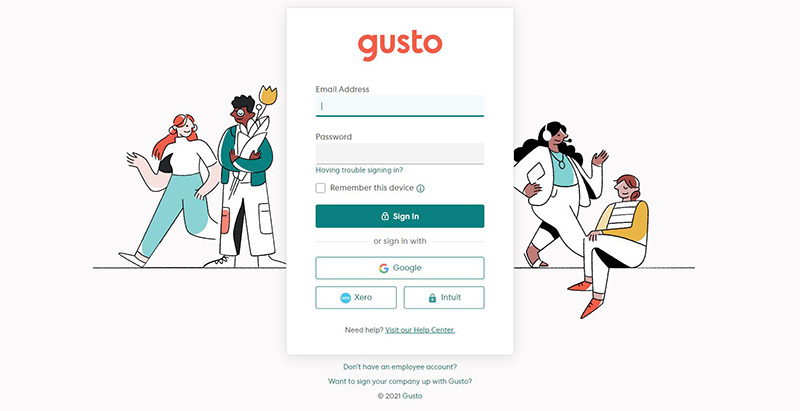
Authorize with Your Gusto Account.

Use your existing Gusto account credential to authorize and give access to Online Check Writer. This will enable the connection of your companies added in Gusto with Online Check Writer.
Step 2

Authorize with Your Gusto Account.

Use your existing Gusto account credential to authorize and give access to Online Check Writer. This will enable the connection of your companies added in Gusto with Online Check Writer.

Step 3

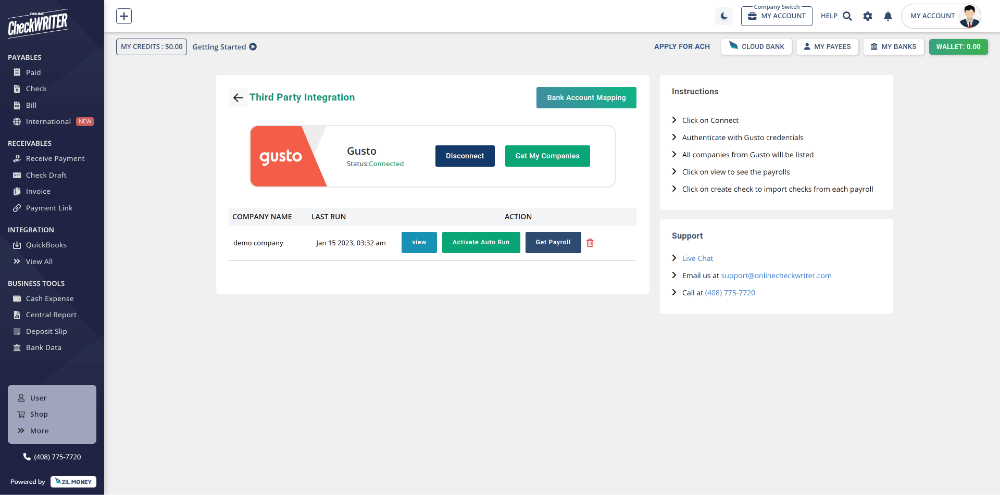
Click on Get My Companies.

Click on Get My Companies to list all companies. Now select your company and click on Get Payroll to fetch the employee and payroll data to Online Check Writer.
Step 4

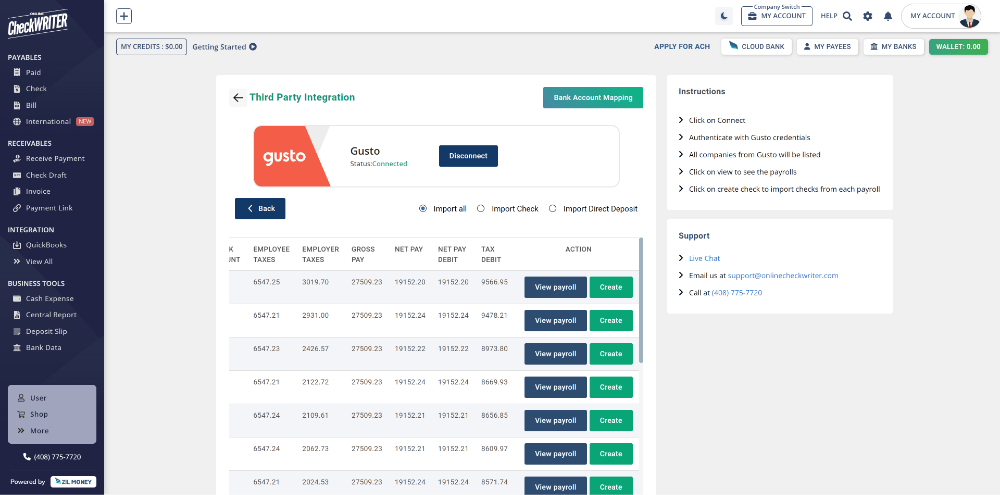
Click on Create.

Click on Create to transfer it into checks instantly. The created checks are now visible in the check list of Online Check Writer.

Step 4

Click on Create.

Click on Create to transfer it into checks instantly. The created checks are now visible in the check list of Online Check Writer.

See how simple is Check Printing with OnlineCheckWriter.com – Powered by Zil Money. Pay and Get Paid instantly without transaction fee.

TRY NOW FOR FREE

FREQUENTLY ASKED QUESTIONS

What is payroll check?

A payroll check is a physical or digital check issued by an employer to an employee as payment for their work. It details the employee's earnings, deductions, and net amount received. With OnlineCheckWriter.com - powered by Zil Money, users can customize and print checks instantly from anywhere using a printer and blank stock paper.

How to create payroll checks?

To create payroll checks, use payroll software or an online service to calculate employee wages, taxes, and deductions. Then, generate and print the checks or distribute them electronically through direct deposit or digital payment platforms. Users can instantly customize and print checks from anywhere using a printer and blank paper via OnlineCheckWriter.com - powered by Zil Money.

How to manage payroll for a small business?

To manage payroll for a small business, use payroll software to automate calculations, tax withholdings, and direct deposits. Ensure compliance with tax regulations and maintain accurate records for each pay period. Users can instantly customize and print checks from anywhere with OnlineCheckWriter.com - powered by Zil Money, using a printer and blank paper.

Payroll Check vs Personal Check

An employer's payroll check is issued to an employee as payment for work performed and includes detailed information on earnings and deductions. In contrast, a personal check is typically used by individuals to make payments from their personal bank accounts and may not include detailed payroll information.
Benefits of Integrating with OnlineCheckWriter.com - Powered by Zil Money

  • Print any imported checks easily.
  • Print on blank check stock.
  • Customize your check with your own designs and logos.
  • Electronic check facility.
  • Transfer the checks to payee via email.
  • Transfer the checks to payee via mail for $1.25.
  • Make secure Direct Deposit / ACH.
  • Multiple company management.
  • Multiple bank account management.
  • Bill payment and invoice management.
  • Pay and get paid by forms or email instantly.
  • And much more!

Have More Questions?

Contact Us

ZIL MONEY CORP

Pricing

News

LLMs

COMPANY

About Us

Press Kit

Press Release

Privacy Policy

Legal Info

Cookie Settings

Contact Us

PAYMENTS

ACH

International Payments

Payment Link

Pay By Credit Card

Payroll By Credit Card

COMMUNITY

Blog

FAQs

FEATURES

Pay By Card

Invoicing

API

INTEGRATIONS

QuickBooks

Xero

Zapier

Zoho Books

Zoho Payroll

Bill.com

Copyright © ONLINE CHECK WRITER

  • Follow
  • Follow
  • Follow
  • Follow
  • Follow
  • Follow

Disclaimer           Terms & Conditions           Privacy Policy           Cookie Policy

Have More Questions?

Contact Us
ZIL MONEY CORP

Pricing

News

LLMs

COMPANY

About Us

Press Kit

Press Release

Privacy Policy

Legal Info

Cookie Settings

Contact Us

PAYMENTS

ACH

International Payments

Payment Link

COMMUNITY

Blog

FAQs

FEATURES

Pay By Card

Invoicing

API

INTEGRATIONS

QuickBooks

Xero

Zapier

Zoho Books

Zoho Payroll

Bill.com

  • Follow
  • Follow
  • Follow
  • Follow
  • Follow
  • Follow

Copyright © ONLINE CHECK WRITER

Disclaimer           Terms & Conditions           Privacy Policy           Cookie Policy

Zil Money is a financial technology company and not a bank. Banking services are provided by participating partner banks. FDIC insurance coverage is available only on eligible deposits and subject to applicable limits and requirements.

“Zero fees,” “Pay $0,” “Get Started Free,” and similar no-fee claims apply only to qualifying accounts and eligible transactions. To qualify for certain no-fee services, customers must maintain a minimum average wallet balance of $10,000 as required under the Wallet Deposit Policy. Accounts that do not meet applicable eligibility requirements may be subject to fees. See the Fee Schedule and Terms & Conditions for details.

Cash-back rewards are available only on qualifying transactions and are subject to eligibility requirements, program rules, and change without notice.

Payment speed claims, including “instant,” “same-day,” and “within minutes,” apply only to eligible transactions and may vary based on payment rail availability, banking partner cut-off times, recipient financial institution processing, compliance reviews, fraud prevention measures, network availability, and other factors.

All products and services are subject to applicable laws, regulations, and the Zil Money Terms & Conditions.