
How to Write a Check in 6 Simple Steps
From dating to signing – master every field, avoid costly mistakes, and discover how to create checks online in 60 seconds.
OnlineCheckWriter.com - powered by Zil Money, is a financial technology company, not a bank. Banking and money movement services are provided through partner financial institutions and licensed service providers. FDIC insurance coverage applies only to eligible deposit products and accounts, and is subject to applicable terms, conditions, limitations, and requirements. Additional information regarding partner institutions, products, and services is available in the applicable terms and agreements.








3.4B
Checks written yearly in the U.S.
1M+
Trusted users
22K+
Integrations
24/7
Support
Six fields. Zero errors
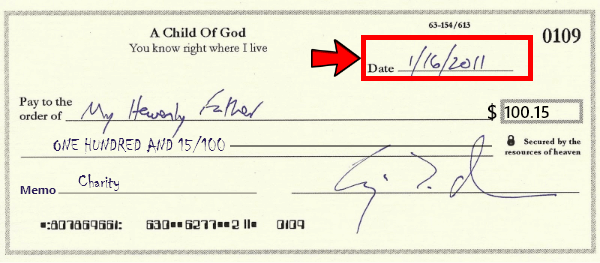
Top right corner
1. Fill in the Date
Write today’s date in MM/DD/YYYY format. This tells the bank when the check can be cashed. You can post-date by writing a future date, though most banks will process it immediately regardless.
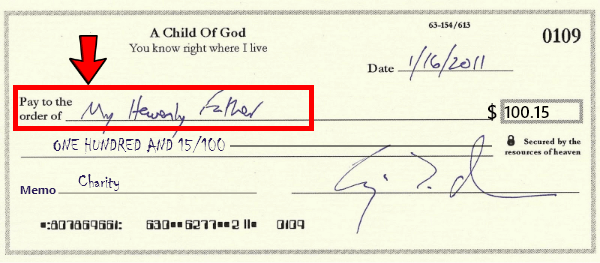
“Pay to the Order of” line
2. Write the Payee Name
Write the full legal name of the person or business. For people, use their full legal name. For businesses, use the complete registered name including LLC/Inc. Writing “Cash” lets anyone cash it – use with extreme caution.
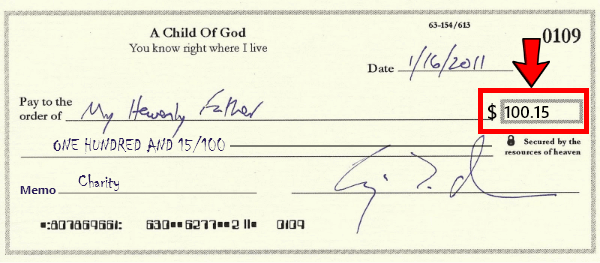
Small $ box on the right
3. Enter the Dollar Amount (Numbers)
Write the payment amount in numerals. Start the first digit pressed hard against the left edge of the box. Always include cents, even for whole amounts (.00). This prevents fraudsters from adding digits.
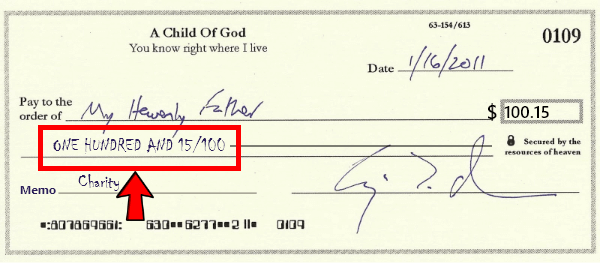
Long line below payee name
4. Write Out the Dollar Amount (Words)
Spell out the full dollar amount. Write cents as a fraction over 100. Start at the far left and draw a horizontal line to fill any remaining space. This written amount is the legally binding figure if there’s a discrepancy.
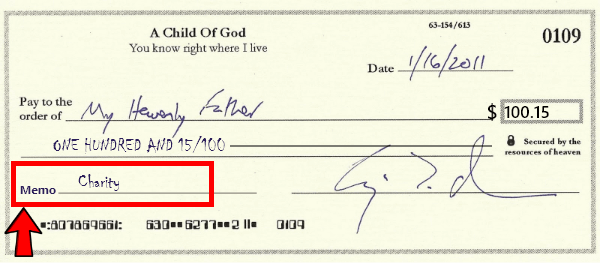
Memo line – bottom left (optional)
5. Add a Memo
Note what the payment is for. When paying bills, always include your account number. For business payments, add the invoice or PO number. For tax-deductible expenses, note the purpose.
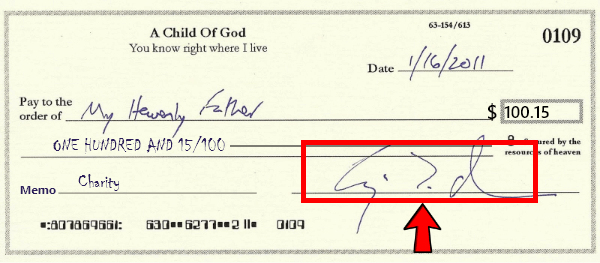
Signature line – bottom right
6. Sign the Check
Sign your legal signature exactly as it appears on your bank account. Without your signature, the check is worthless. Use a pen – never pencil, which can be erased. Never sign a blank check.
A correctly filled check
5 Costly Mistakes to Avoid
Mismatched Amounts
Writing $150 in the box but “one hundred fifty-five” in words. Banks use the written amount as legally binding.
→ Double-check both amounts match exactly before signing.
Forgetting the Date
An undated check can be cashed at any time, creating financial and record-keeping chaos.
→ Always write today’s date as your very first action.
Leaving Space Around Numbers
Gaps before or after amounts let fraudsters insert additional digits, multiplying your payment.
→ Start numbers against the left edge; draw a line after written amounts.
Using Pencil
Pencil can be erased and re-written, allowing anyone to alter any field on the check.
→ Always use black or blue ink pen, no exceptions.
Signing Blank Checks
A signed blank check is an open invitation – anyone who finds it can fill in any name and amount.
→ Only sign a fully completed check. Mark unused checks VOID immediately.
How to Write a Void Check
A void check shows your routing and account numbers without being cashable – required for direct deposit and automatic payment setups.
1.
Get a blank check from your checkbook
2.
Write “VOID” in large letters across the front using black or blue pen
3.
Make sure “VOID” covers the signature line, amount box, and payee line
4.
The bank routing and account numbers at the bottom must remain clearly visible
5.
Never write any dollar amount – a void check must never be cashable

There’s a better way to write checks
TRADITIONAL METHOD
Expensive, slow, error-prone
- Wait 2-3 weeks for bank delivery
- Pay $20-30 per box of 100 checks
- Void the entire check for every mistake
- Handwrite everything – tedious and slow
- Handwritten checks are easier to forge
- No digital tracking or audit trail
ONLINECHECKWRITER.COM
Fast, secure, professional
- Print checks instantly on blank paper
- Plans from $30/month
- Edit and correct before printing
- Professional branded design with logo
- Enhanced security and fraud protection
- Full digital tracking and audit trail
- Works with QuickBooks, Xero, and more
- Mail checks via USPS/FedEx for just $1.25
FREQUENTLY ASKED QUESTIONS
Can I write a check to myself?
Yes. Write your own name as payee, then deposit or cash it at your bank. This is a common and legitimate way to transfer money between your own accounts.
How long is a check valid?
Most banks won't accept checks older than 6 months (180 days). While some may accept them, it is not guaranteed. If you have an old check, contact the issuer for a fresh one.
Can someone cash a check without ID?
Generally no. Banks require valid government-issued identification to cash checks. Depositing into your own account typically requires less verification, but cashing still requires ID.
What if I make a mistake writing a check?
Write "VOID" across the front and start with a new check. Never cross out or use correction fluid - banks may reject altered checks. The voided check should be kept or shredded, never discarded unsecured.
Is it spelled "check" or "cheque"?
In American English, use "check." British English uses "cheque." Both refer to the same financial instrument - the spelling depends on your region.
Can I create checks online for free?
OnlineCheckWriter.com offers plans starting at $30/month with a 14-day trial. While not free, this quickly pays for itself compared to repeatedly ordering $20-30 boxes of pre-printed checks.
Real Stories, Real Results
Experience fast, secure, and cost-effective payments


Karla C.
"The best online software"
Save time

Chansa Catherine
"Overall it was a good experience, loved the mobile app, came in handy when on the move out of the office"
Money arrives in minutes

Danylo
"I use Online Check Writer daily and I am satisfied that I selected that product"