

 ChatGPT
 Claude
 Grok
Grok
 Perplexity
 Gemini
Last updated: June 19, 2026
Quick answer: The MICR line is the magnetic, machine-readable strip at the bottom of a check that encodes your routing number, account number, and check number in the E-13B font so a bank can sort and clear the check automatically. With check software like OnlineCheckWriter.com you can print a valid MICR line on blank check stock using a standard laser printer.
The MICR line is the row of stylized numbers and symbols printed along the bottom of every check. It holds your bank’s routing number, your account number, and the check number in a magnetic, machine-readable font, so a bank can sort and clear the check automatically. Get the MICR line right and a check prints on blank paper and clears like a standard check; get it wrong and the check gets rejected or held for manual handling.
Most people never think about that line until a check comes back unread and the bank cannot say exactly why. The answer is almost always one of four things: the wrong font, the wrong ink, something printed over the line, or a single mistyped digit. This guide covers all four, what each field in the line actually means, and how to print the line yourself so a check clears the first time.
Key takeaways
- MICR stands for Magnetic Ink Character Recognition. It is the machine-readable line at the bottom of a check.
- It carries three core pieces of data: the routing number (your bank), the account number (you), and the check number, framed by special symbols.
- The font is standardized. The United States, Canada, the UK, and Australia use E-13B; some other countries, including France and parts of Latin America, use a different one called CMC-7.
- The ink matters. MICR characters are designed to be read magnetically, which is what makes the line reliable even if the check is stained or marked.
- You can print a valid MICR line on blank check stock with the right software and a standard laser printer, and it clears through the automated system the same way a pre-printed check does, provided the MICR line is accurate and machine-readable.
What does MICR stand for, and what is the MICR line on a check?
MICR stands for Magnetic Ink Character Recognition. The MICR line is the band of specially shaped characters printed along the bottom of a check that encodes the routing number, account number, and check number in a format both a machine and a person can read.
The technology dates to the 1950s, when U.S. banks needed a way to process a fast-growing flood of paper checks without reading each one by hand. The American Bankers Association adopted the E-13B font as the standard in 1958, and it has been the backbone of automated check processing ever since. The format is governed today by ANSI X9.100-160 in the United States and ISO 1004 internationally. When a check reaches the bank, a sorting machine reads the MICR line to know which bank the check is drawn on and which account to debit, then routes it accordingly.
Two things make the MICR line special compared with the rest of the print on a check:
- The characters have a deliberate, blocky shape so a machine can tell a 3 from an 8 even at high speed.
- The characters are meant to be printed with magnetic ink or toner, so the reader can detect them magnetically, not just optically. That magnetic signal is what keeps the line readable even if a stamp, a signature, or a coffee ring crosses it.
How do I read the numbers on the bottom of a check?
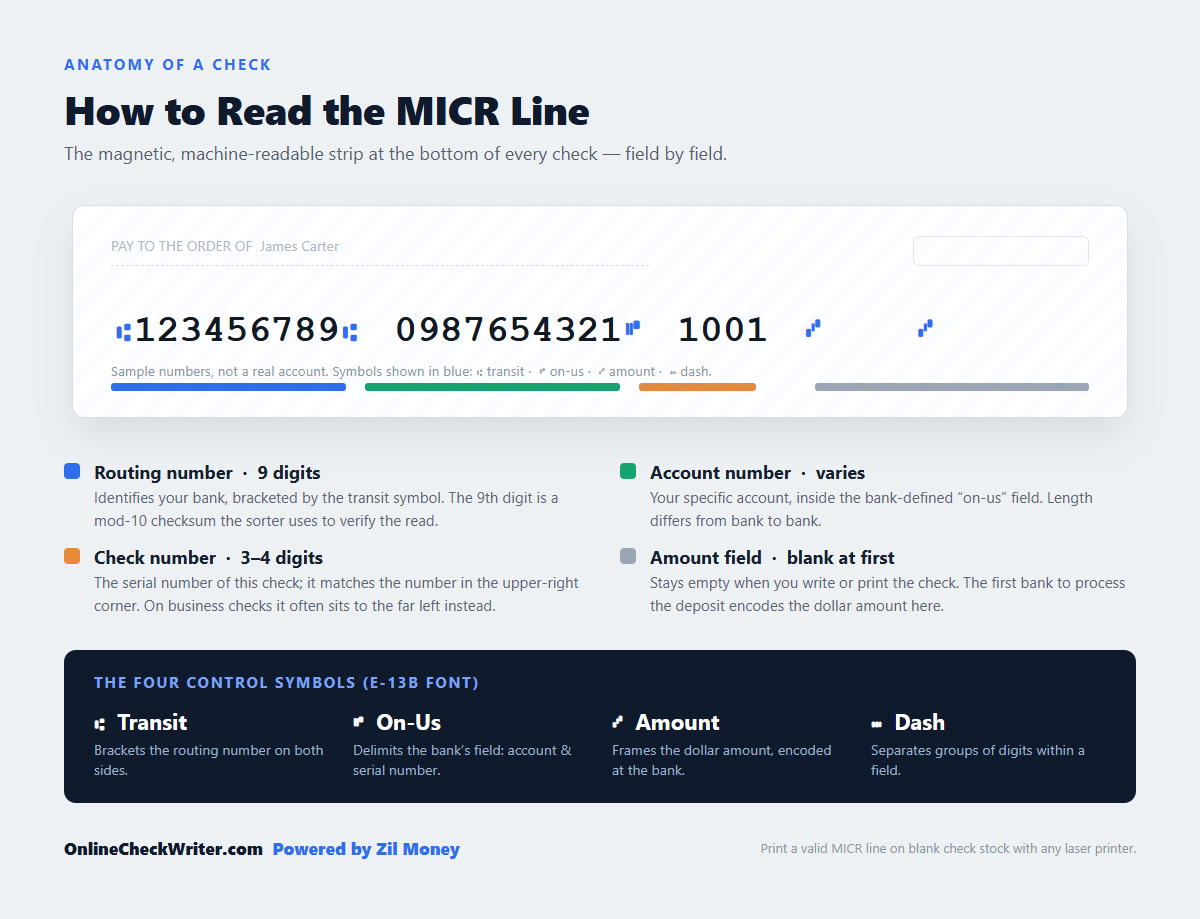
You read the MICR line left to right, and on a standard U.S. personal check the order is routing number, then account number, then check number, with the amount field at the far right. Special symbols separate the fields so the bank’s reader knows where each one begins and ends. Business checks carry the same data in a different arrangement, covered just below.
On a standard U.S. personal check, the layout reads left to right as:
| Field | What it is | Length | Where it sits |
|---|---|---|---|
| Routing number | The code that identifies your bank | Always 9 digits | Left, framed by the “transit” symbol |
| Account number | The number that identifies your specific account | Varies by bank | Middle, in the “on-us” field |
| Check number | The sequential number of that individual check | Usually 3 to 4 digits | With or beside the account field; it matches the number in the upper-right corner of the check |
| Amount | The dollar amount | Up to 10 digits | Far right, framed by the “amount” symbol, blank until the bank encodes it |
The routing number is always nine digits and is wrapped in a pair of identical “transit” symbols. The ninth digit is a checksum, calculated from the other eight using a mod-10 formula, so the sorter can verify it read the routing number correctly and catch most single-digit misreads or transpositions. The account number sits in the on-us field and varies in length from bank to bank. The amount field at the far right stays empty when you write or print the check; the first bank to process the deposit encodes the dollar amount into it.
Business checks differ. The check (serial) number usually moves to an auxiliary on-us field positioned to the left of the routing number, with the account number following the routing number. So “routing, then account, then check number” describes a personal check, while a business check often leads with the check number on the far left. Either way the same core data is present, just arranged to a different standard layout.
What are the strange symbols in the MICR line?
The MICR line uses four special symbols, not just digits, to tell the bank’s reader where each field starts and stops. They are part of the standard font and each has a specific job.
The four MICR symbols are:
- Transit (⑆): Brackets the routing number on both sides so the reader can isolate the bank’s nine-digit code.
- On-Us (⑈): Delimits the bank-defined “on-us” field, the part that is “on us” to the drawee bank. It holds the account number, often the check serial number, and any internal codes the bank uses, and the bank controls its exact format between the transit and amount fields.
- Amount (⑇): Frames the dollar amount. On a blank check this field is empty; the first bank to process the deposit, the bank of first deposit, MICR-encodes the dollar amount into this field during proof and encoding, so every downstream sorter can read it.
- Dash (⑉): Separates groups of numbers within a field when a bank’s format calls for it.
You will not type these symbols yourself. They are built into the MICR font and placed automatically by whatever software or pre-printing process creates the check. The symbols are the punctuation that lets a machine parse the line without ambiguity, which is why it is not simply a string of digits.
What font is the MICR line, and why does it look like that?
The MICR line is printed in a standardized magnetic font. In the United States, Canada, the United Kingdom, and Australia that font is called E-13B; some countries, including France, parts of southern Europe, Latin America, and the Middle East, use a different standard called CMC-7. The unusual, thick-and-thin shapes are not a style choice, they are engineered so a magnetic reader produces a distinct signal for each character. The “13” in the name refers to the 0.013-inch grid the characters are drawn on.
E-13B contains the ten digits zero through nine plus the four control symbols above. Each character is drawn so that, when scanned, it generates a unique magnetic waveform. That is why the strokes vary in thickness: the varying widths create the signal pattern the reader is matching against. A cleaner-looking font would read worse, because its characters would be harder for a machine to tell apart.
A few practical points follow from this:
- You cannot fake the MICR line with a lookalike font. A visually similar font that is not true E-13B may pass a glance but fail a magnetic read, which sends the check to slow, manual processing.
- Size and spacing are part of the spec. MICR characters print at a defined size and pitch so they land in the right position for the reader. Good check software handles this for you.
- The line sits in a reserved band. The bottom strip of the check, roughly the last 5/8 inch, is kept clear of other printing so nothing interferes with the read.
Does the MICR line have to be printed with magnetic ink?
The banking standard requires the MICR line to be printed with magnetic ink or toner, so a check printed without it is technically a non-conforming item. In practice many checks still clear on an optical read, but magnetic printing is what keeps a check off the manual-review pile, and it is what the spec calls for.
Modern check sorters often have both magnetic and optical readers, and an optical reader can sometimes recognize MICR characters printed in ordinary toner. But the magnetic read is the reliable one, because it is unaffected by anything printed on top of the line. Since the Check 21 Act took effect in 2004, most checks clear as digital images rather than traveling as paper, so the magnetic read matters mainly when a physical item is sorted. Even then, a clean MICR line is what every image-capture and sorting system keys on.
In practice, businesses that print their own checks use MICR toner in a laser printer. MICR toner contains iron oxide, which is what gives the printed characters their magnetic signal, and it loads like ordinary toner. For everyday volumes, many businesses print acceptable MICR lines on a regular laser printer using MICR toner and true E-13B software. For high volumes or the most reliable magnetic signal, dedicated MICR printers and cartridges, from makers such as TROY or Source Technologies, add the precise alignment and toner density banks expect. Either way you do not need a printing press; the right toner and the right font do most of the work.
Can I print a check with a MICR line on blank paper myself?
Yes. You can print a complete, valid check, MICR line included, on blank check stock with check-printing software and a laser printer. The software lays out the routing number, account number, and check number in the correct E-13B font and position, and the printer renders them, ideally with MICR toner, at the moment you create the check.
This is the core of how on-demand check printing works. Instead of ordering pre-printed checks tied to one bank account and waiting for them to arrive, you store your account details in software and print only when you need a check. The bank routing and account data, the payee, the amount, and the MICR line are all generated together on a blank sheet.
With OnlineCheckWriter.com, Powered by Zil Money, the MICR line is handled for you. You add a bank account, and when you create a check the platform formats the routing number, account number, and check number in the correct font and places them in the reserved band at the bottom. You can print on blank check stock with a standard printer, or skip printing entirely and have the check printed and mailed for you. Either way you are not buying a separate box of pre-printed checks for every account.
What does a bank require to accept a check I printed?
A bank will accept a check you printed when the MICR line is correct and readable and the check carries the other required elements: a valid date, the payee’s name, the amount in numbers and words, and an authorized signature. The MICR line is what the machine reads; the rest is what makes the document a legal instruction to pay.
For the MICR line specifically, “correct and readable” means:
- Accurate data. The routing and account numbers must match the account the check is drawn on. A single wrong digit sends the check to the wrong bank or account.
- The right font and symbols. True E-13B characters with the proper transit, on-us, amount, and dash symbols, not a visual imitation.
- Correct position and clear space. The line sits in the reserved bottom band with nothing printed over it.
- A clean magnetic read. Printing with MICR toner is the reliable way to meet this; it is what keeps the check on the automated path instead of manual review.
Get those right and the check generally clears like a pre-printed check. The check stock itself can be plain or security paper; what the clearing system cares about is the MICR line and the legally required fields.
Why does a check with a bad MICR line get rejected?
A check is rejected or delayed when the sorter cannot read the MICR line cleanly, which usually traces back to the wrong font, the wrong ink, damage to the line, or incorrect data. When the automated read fails, the check drops to slower manual processing, and if the data is actually wrong, the payment can be misrouted entirely.
The common causes:
- Lookalike font. A regular number font instead of true E-13B reads inconsistently or not at all.
- Non-magnetic ink with no optical fallback. If a sorter relies on the magnetic read and the line was printed in ordinary toner, the character can come back as unreadable.
- Smudges, folds, or printing in the band. Anything crossing the reserved bottom strip can disrupt the read. A folded check or a stamp over the line is a frequent culprit.
- Wrong numbers. A wrong account digit can read fine mechanically but route the money to the wrong account, which is harder to catch and worse to fix. A transposed routing digit usually fails the checksum and bounces the read instead.
- Poor print quality. A low-toner or misaligned print can thin out the characters until the reader cannot match them.
The fix for nearly all of these is the same: use software that renders true E-13B, such as OnlineCheckWriter.com, print with MICR toner, keep the bottom band clean, and confirm the routing and account numbers before you send.
Is the MICR line a security feature, and what about check fraud?
The MICR line is primarily a processing feature, not a fraud shield, though its specialized font and magnetic ink do make a check harder to casually counterfeit. The MICR line tells the banking system where to route a check; it does not by itself prevent someone from altering or forging one.
This matters because check fraud is a real and growing problem. The Financial Crimes Enforcement Network (FinCEN) issued an alert on February 27, 2023, about a nationwide surge in mail-theft-related check fraud, noting that the U.S. Postal Inspection Service received 299,020 mail-theft complaints between March 2020 and February 2021, a 161 percent increase over the prior year (source: FinCEN, February 2023).
The MICR line is not the defense against that. The defenses are things like security check stock, careful handling, tracked mailing, and bank tools such as Positive Pay, which matches checks presented for payment against a list of checks you actually issued. If you print your own checks, treat the MICR line as the part that makes the check work mechanically, and treat fraud prevention as a separate layer you add on top.
Is the MICR routing number the same as the one I use for direct deposit?
For ACH and direct deposit, almost always yes. The routing number in the MICR line is your bank’s check routing number, and for direct deposit and other ACH transactions it is almost always the same number. Wire transfers are the common exception: many banks use a separate wire routing number that is published on the bank’s website and often is not printed on checks at all.
So for direct deposit and ACH, the number on your check is normally the right one to use. For a wire, confirm the wire routing number with your bank rather than copying the one off your check. For writing or printing a paper check, the routing number that belongs in the MICR line is the check routing number tied to that account.
Frequently Asked Questions
What does MICR stand for?
MICR stands for Magnetic Ink Character Recognition. It refers to both the technology and the line of magnetic, machine-readable characters printed at the bottom of a check.
What information is in the MICR line?
The MICR line contains the bank routing number, the account number, and the check number, separated by special symbols. It also has an amount field at the far right that the first bank to process the deposit fills in during encoding.
What font is used for the MICR line?
In the United States, Canada, the UK, and Australia the standard MICR font is E-13B. Some countries, including France and parts of Latin America, use a different standard called CMC-7. The characters are shaped to produce a distinct magnetic signal for each digit and symbol.
Do I have to use magnetic ink to print a check?
The banking standard calls for magnetic ink or toner, so a non-magnetic check is technically non-conforming. Many checks still clear on an optical read, but magnetic printing is the dependable approach. MICR toner loads like ordinary toner; a regular laser printer is fine for everyday volumes, while high-volume shops use dedicated MICR printers for the most reliable signal.
Can I print a check with a MICR line at home or in the office?
Yes. With check-printing software and a laser printer you can print a complete check, including a correctly formatted MICR line, on blank check stock. Using MICR toner is recommended for a clean read.
Why was my printed check rejected?
The most common reasons are a lookalike font instead of true E-13B, non-magnetic ink with no optical fallback, smudges or folds across the bottom band, or incorrect routing and account numbers. Correct font, MICR toner, a clean band, and verified numbers resolve almost all of these.
Is the MICR line a security or anti-fraud feature?
It is mainly a processing feature. Its specialized font and magnetic ink make casual counterfeiting harder, but it does not prevent forgery or alteration on its own. Fraud prevention comes from security stock, careful handling, tracked mailing, and tools like Positive Pay.
Is the MICR routing number the same as my ACH routing number?
For ACH and direct deposit, almost always yes: the routing number on your check is your ACH routing number. The common exception is wire transfers, where many banks use a separate wire routing number that often is not printed on checks. Confirm the wire number with your bank.
What are the symbols in the MICR line?
There are four: the transit symbol that brackets the routing number, the on-us symbol that delimits the bank’s field (account number plus the check serial number and any internal codes), the amount symbol that frames the dollar amount, and the dash symbol that separates groups of digits. They are part of the MICR font and placed automatically.
Where on the check is the MICR line printed?
Along the bottom edge, in a reserved band that is roughly the last 5/8 inch of the check. That band is kept clear of other printing so nothing interferes with the magnetic read.
Can I print checks for more than one bank account on blank stock?
Yes. Because the MICR line and bank details are generated at print time, one box of blank check stock works for every account you are authorized to print from, instead of a separate pre-printed box per account.
Conclusion
The MICR line looks cryptic, but it is just a precise, machine-readable label: routing number, account number, and check number, drawn in the E-13B font and printed so a bank’s sorter can read it magnetically. Once you know what each field and symbol does, printing your own checks stops being mysterious. With the right software and MICR toner, a check on blank stock carries a MICR line that clears like a pre-printed one.
If you want the MICR line handled for you, create a check with OnlineCheckWriter.com and print on blank stock, or have it printed and mailed for you.
OnlineCheckWriter.com, Powered by Zil Money, is a financial technology company and not a bank. Banking services are provided by our partner bank, Member FDIC. FDIC insurance applies only to eligible products associated with those that have funds held in accounts at the partner bank, subject to applicable limits and requirements.