
Salesforce Integration: Create Payees and Issue Checks Faster
Managing payments shouldn’t require copying contact details from your CRM into your payment system. With the OnlineCheckWriter Salesforce integration, you can sync contacts directly from Salesforce, create payees instantly, and issue checks without manual data entry. Import contacts, avoid duplicate records, and streamline your payment workflow with automated payee creation. This integration is ideal for businesses that rely on Salesforce for customer and vendor management and need fast, accurate check payments.








OnlineCheckWriter.com- Powered by Zil Money is a fintech, not a bank. FDIC coverage is provided through our partner banks Texas National Bank and Lincoln Savings Bank.

How It Works (5 Simple Steps)
Start Paying Contacts from Salesforce in Minutes
Step 1: Click Connect – Connect OnlineCheckWriter to Salesforce with one click.
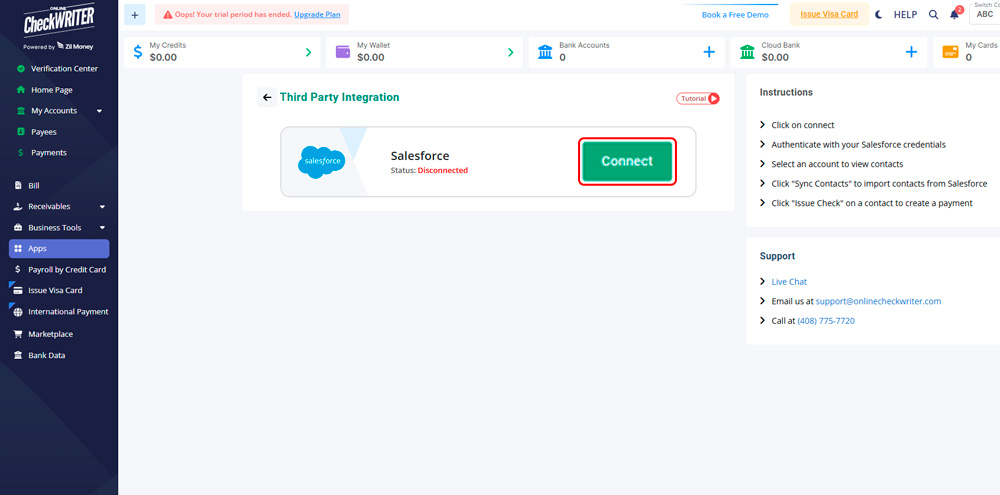
Step 2: Authenticate Your Account – Log in securely using your Salesforce credentials.

Step 2: Authenticate Your Account – Log in securely using your Salesforce credentials.
Step 3: Sync Contacts – Click “Sync Contacts” to import contacts directly from Salesforce into OnlineCheckWriter.
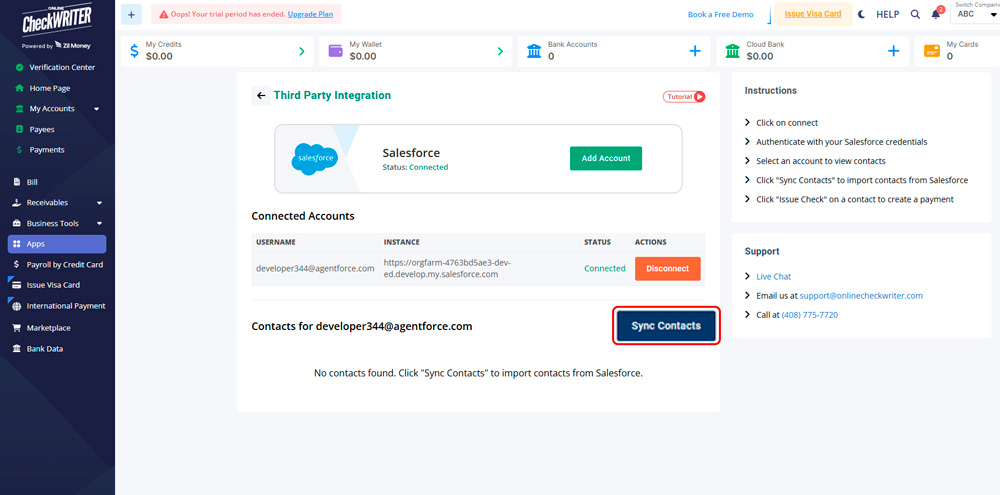
Step 4: Issue Checks – Click “Issue Check” on any contact to automatically create a payee and start a payment.
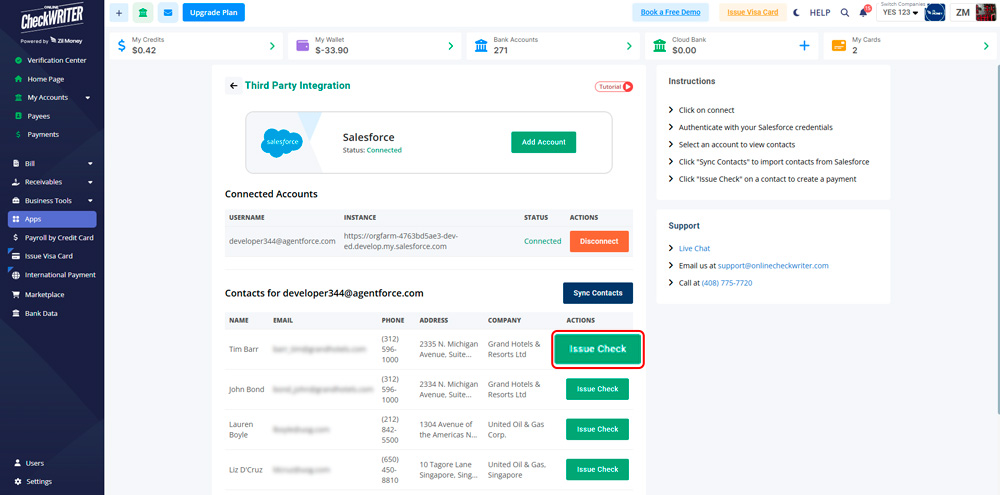
Step 4: Issue Checks – Click “Issue Check” on any contact to automatically create a payee and start a payment.
Step 6: Update Anytime – Change your Salesforce connection or sync settings whenever your team changes.
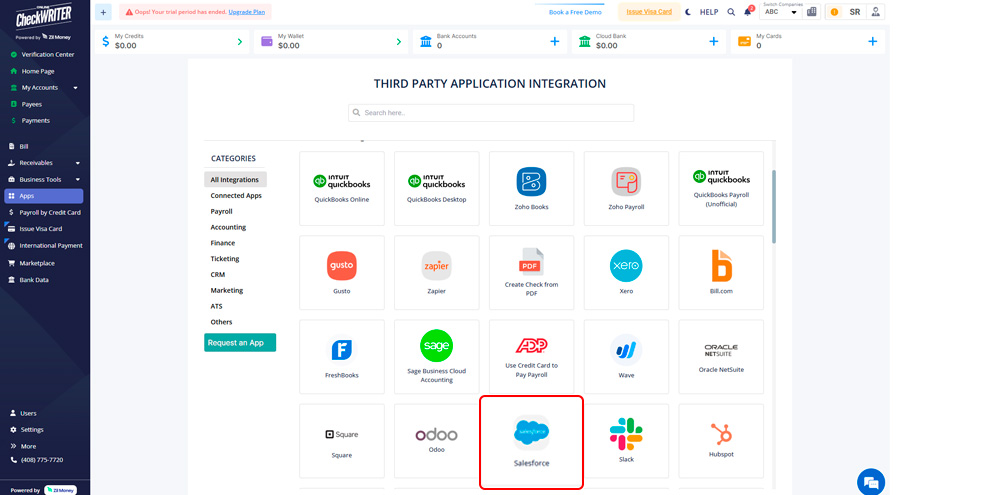
This simple workflow eliminates manual entry and makes check payments fast, accurate, and scalable for any team size.

Easy To Access
Instant Access To Your Account Anywhere, Anytime.

High Security
Secured With Encryption, Fraud Detection, and Infrastructure.

Easy Payment
Efficiently Transfer Funds To Where They're Needed.

Pay Salesforce Contacts Without Manual Work
Connect OnlineCheckWriter to Salesforce today and issue your first check in minutes. No credit card required. Start using automated check payments and simplify your workflow immediately.




Built for Clean Data and Faster Payments
This integration keeps your payment data aligned with your CRM. Contacts sync directly from Salesforce, payees are created automatically, and your records stay organized. You control who becomes a payee, issue checks in seconds, and manage everything from one dashboard. This check management system reduces errors, saves time, and keeps your payment workflow efficient.


MULTIPLE FEATURES, ONE PLATFORM

CONNECT ANY BANK, PREVENT FORGERIES

OPEN A MODERN CHECKING ACCOUNT WITH ZIL US

What You Get
Faster check payments. Accurate payee records. Less manual work. Syncing Salesforce contacts ensures your payment data stays up to date and easy to manage. Whether you’re paying vendors, partners, or service providers, this automated check payment solution scales effortlessly—from small teams to large enterprises—without adding complexity.
FREQUENTLY ASKED QUESTIONS
Does this integration help me create payees faster?
Yes. Contacts synced from Salesforce can be turned into payees instantly when you click “Issue Check.”
Can I choose which contacts to sync?
Yes. You select the Salesforce account and control which contacts you use for payments.
Does clicking “Issue Check” create the payee automatically?
Yes. Issuing a check automatically creates the payee record in OnlineCheckWriter.com.
Can I print checks or have them mailed?
Yes. After creating payees, you can create checks and choose to print them yourself or have them mailed.
Real Stories, Real Results
Experience fast, secure, and cost-effective international transfers


Karla C.
"The best online software"
Save time

Chansa Catherine
"overall it was a good experience, loved the mobile app, came in handy when on the move out of the office"
Money arrives in minutes

Danylo
"I use Online Check Writer daily and I am satisfied that I selected that product"